Starting a UK SaaS in 2026 (3/3): Brand, Privacy, and Launch
The company exists, the bank works, and the tax office knows you are trading. The last stretch before launch is about the product: protecting its name, handling user data legally, getting free cloud credits, and avoiding a Google review that can cost hundreds of dollars a year.
This is Part 3 of a three-part series. Part 1 covered setting up the company and banking; Part 2 covered tax.
Register your trade mark and data protection fee yourself (about £270 in total), apply for cloud credits as soon as your company and website are live, and ask Google for as little access to your users’ accounts as possible.
1. Protect Your Name and Pay the Data Fee Yourself
| Item | Do It Yourself | Typical Agency Price |
|---|---|---|
| Trade mark (UK Intellectual Property Office) | £170, plus £50 per extra category | £1,000+ |
| Data protection fee (ICO, the UK data regulator) | £47/year by Direct Debit | £90+ as an add-on |
Trade mark. This stops someone else using your product name. A software product usually needs two categories: downloadable apps and online software, so £220 in total. Search the official database first, register the name itself (not a logo), and register it in the company’s name rather than your own. Use ™ while you wait; only use ® once it is officially registered, because using ® early is against the law.
Data protection fee. If your product stores user accounts or email addresses, your company almost certainly has to pay this yearly fee to the ICO. Small companies pay the lowest rate, and it takes about ten minutes on ico.org.uk.
2. Getting Free Cloud Credits
Google, Amazon (AWS), and Microsoft all give startups free cloud credits. They check for a company website, an email address on your own domain, and a registered company. Apply as soon as you have all three, because approval can take weeks.
Three habits kept my applications moving:
- Check your support tickets, not just your email. Tickets waiting on you often close automatically after about 48 hours. Reply, even if only to say you are still checking.
- Do not send repeat follow-ups. A new email or a second ticket can push you to the back of the queue.
- Keep some cash anyway. Credits only cover cloud hosting, not other software subscriptions or company fees.
3. “Sign in With Google” Can Get Expensive
If your app asks for access to a user’s Google account (their calendar, email, or files), Google sorts each permission into one of three levels. The level decides how hard your launch is.
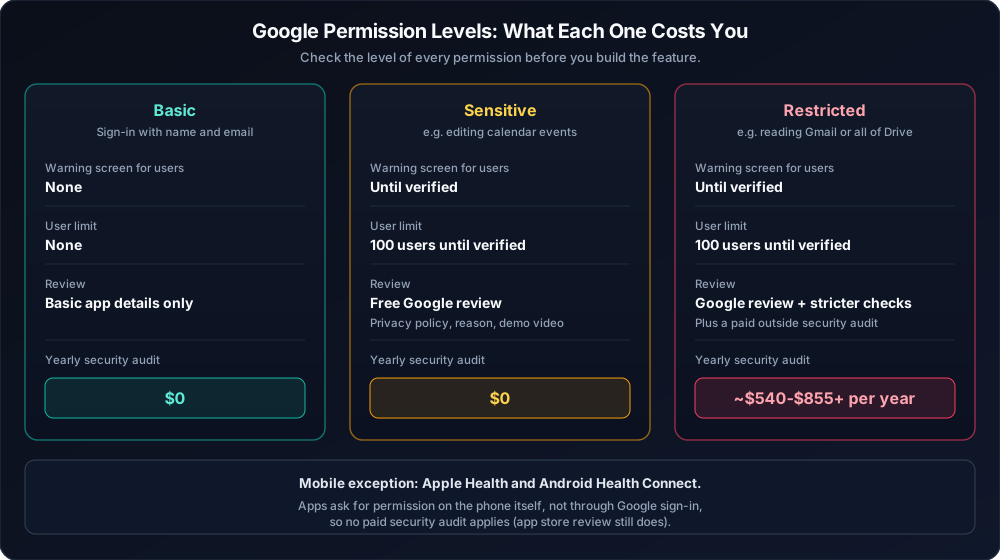
| Level | Example | What Happens Before Launch | Yearly Cost |
|---|---|---|---|
| Basic | Sign-in with name and email | Nothing special | £0 |
| Sensitive | Editing calendar events | Free Google review; until it passes, users see a warning and you are capped at 100 users | £0 |
| Restricted | Reading Gmail or all of Drive | Google review plus a paid security audit, renewed every year | roughly $540-$855+ |
The rule: ask for the smallest permission your feature needs. Google’s console shows the level of each permission when you add it, so check before you build the feature. Basic permissions only means no warning screen and no user limit.
Health data has a cheaper route. Mobile apps that read from Apple Health or Android Health Connect get permission directly on the phone, so no paid Google security audit applies.
4. Stay Hard to Impersonate
Sharing your journey in public is great for learning and trust. It also helps scammers. Someone who knows your bank, your mobile network, and a support ticket number sounds exactly like a real fraud team on the phone.
Share lessons and options, and keep these private:
- Which banks you use, for the business and personally.
- Your mobile network (scammers use it to hijack your phone number).
- The email addresses you use for tax, billing, or admin.
- Ticket numbers, tax references, and account balances.
That is why every provider in this series appears as an option, never as my choice.
5. The Launch Checklist
[ ] 1. Register the company using a business address service; verify your identity.
[ ] 2. Open a business bank account (plus a multi-currency one if you pay in dollars).
[ ] 3. Connect your bank and Stripe to a bookkeeping app; put starting money in as a loan.
[ ] 4. Add company details, a privacy policy, and terms to your website.
[ ] 5. Register your trade mark in the company's name.
[ ] 6. Pay the ICO data protection fee.
[ ] 7. When the tax letter arrives: set up a business tax account and register
       for Corporation Tax within 3 months of starting to trade.
[ ] 8. Enter the newest activation code within 28 days.
[ ] 9. Apply for cloud credits; check the level of every Google permission you need.
[ ] 10. Make a real test purchase, refund it, and check it shows up correctly
        in Stripe, your bank, and your bookkeeping app.
Once the company admin is finally out of the way, the real work is turning a big goal into something you actually do this week. That is why I build JupiterGoals, software that turns big goals into calm, realistic daily plans, and you can try it free for 7 days.
Related Articles
Starting a UK SaaS in 2026 (1/3): Formation and Banking
A plain-English guide for engineers starting a UK software company: how to set up the company without publishing your home address, and how to pick a bank and bookkeeping app that cost close to £0.
Read article →Integrating Stripe & Building the Onboarding Phase
How I integrated Stripe to build a privacy-first billing and onboarding architecture without storing sensitive payment data.
Read article →All your goals. One realistic plan.
JupiterGoals fits everything you're working toward into one plan sized to your day. Shrink or swap a step on hard days and keep moving.
Start freeNot ready to sign in? Get product updates by email →