Starting a UK SaaS in 2026 (1/3): Formation and Banking
If you can build software, you can set up a UK company. The paperwork is not hard, it is just unfamiliar, and a few early choices are surprisingly hard to undo.
I went through all of it while turning JupiterGoals into a UK limited company. This three-part series is the plain-English guide I wanted at the start: the options side by side, what they cost in 2026, and the traps in the order you will meet them.
The short version: get a business address before you register the company, pick a bank that does not charge much for paying in dollars, and connect your bank to a bookkeeping app from day one.
These are a founder’s notes, not legal or tax advice. Prices change often, so check before you buy.
- Part 1 (this post): setting up the company, your bank, and your bookkeeping.
- Part 2: registering for tax and claiming what you spent before launch.
- Part 3: protecting your name, data protection, cloud credits, Google sign-in reviews, and a launch checklist.
What It Costs
| Item | 2026 Cost |
|---|---|
| Registering the company yourself | £100 |
| Registering through a company that also gives you a business address | ~£115-£160 |
| Yearly company check-in (the “confirmation statement”) | £50/year |
| Business bank account | £0-£12.49/month |
| Bookkeeping app | £0-~£33/month (free with some banks) |
| Trade mark for your product name | from £170 (Part 3) |
| Data protection fee | £47/year (Part 3) |
1. Setting Up the Company: Your Address Is the Big Decision
UK companies are registered with Companies House, the government’s public list of every company. Registering costs £100 online. The fee is the easy part; the decision that sticks is which address you give them.
You give three addresses: the company’s official address, a contact address for you as director, and your home address. Only your home address is kept private. The other two are published online for anyone to see, and old records stay public more or less forever.
So if you work from home and type your home address into every box, it ends up public twice. The fix is to use a business address service for the first two boxes.
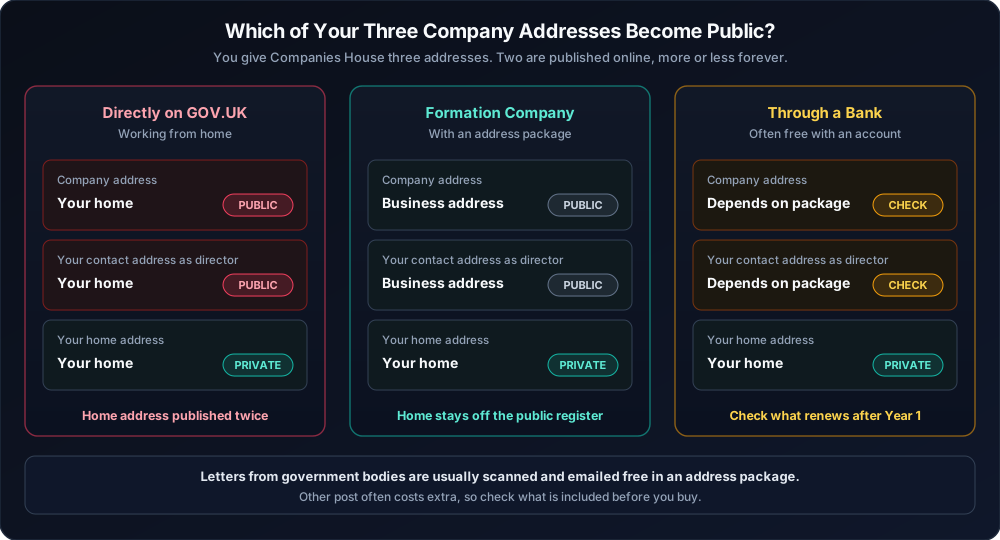
Two newer rules to know: the company address must be somewhere post actually reaches a person (not a PO box), and every director now has to verify their identity with Companies House before or during registration.
Four ways to register
| Route | Cost | Good For |
|---|---|---|
| Directly on GOV.UK | £100 | People who already rent an office. Poor privacy if you work from home. |
| Formation companies (1st Formations, Rapid Formations, Quality Company Formations) | ~£115-£160 with an address package | Solo founders working from home. Check the price after Year 1. |
| Through a bank (Tide, ANNA) | Often free if you open an account | Lowest upfront cost, but it ties you to that bank, and address terms vary after Year 1. |
| Startup legal platforms (SeedLegals) | Subscription | Teams raising investment right away. Overkill for a solo founder. |
If you use an address package, check what post it covers. Letters from government bodies are usually scanned and emailed to you for free; other post often costs extra. That matters because the tax office sends important codes to this address (Part 2).
2. Choosing a Business Bank
You need a separate bank account for the company. The main question for a software founder is what it costs to pay in US dollars, because cloud hosting, AI services, and developer tools usually bill in dollars.
| Bank | Monthly Cost | Good to Know |
|---|---|---|
| Starling | £0 | Free UK transfers; connects to all the main bookkeeping apps |
| Monzo | £0, or £9 for Pro | Pro adds tax savings pots and bookkeeping sync |
| Mettle / NatWest | £0 | Includes the FreeAgent bookkeeping app free if you make one payment a month; Mettle is for companies with up to two owners |
| Tide | £0, or £12.49 for Smart | Free plan charges 20p per transfer after 5 a month, and 2.75% on card payments in other currencies |
| Wise | £50 one-off | Accounts in dollars and euros with low exchange fees |
| Revolut | From £10/month for paid plans | Multi-currency accounts and cards |
On a hypothetical $400 a month of dollar bills, a 2.75% card fee adds up to roughly £100 a year. Many founders keep a normal UK account for tax and customer payments, plus a multi-currency account for US suppliers.
One more thing to check: Starling, Monzo, and NatWest are full banks, so the government-backed scheme protects up to £120,000 if the bank fails. Some others are “e-money” accounts that keep your money separate but are not covered by that guarantee. Each provider says which it is on its website.
3. Bookkeeping From Day One
A bookkeeping app records every payment in and out, which makes your yearly tax return far easier. The main options are FreeAgent (free with some banks), Xero (popular with accountants), QuickBooks, and Pandle (has a free plan).
Two habits save hours later:
Put your starting money in as a loan. Transfer your starting funds (say, a hypothetical £500) from your personal account with a reference like “Director’s loan”. The books then show the company owes you that money, so it can pay you back later without any tax.
Connect your bank and Stripe before your first sale. Stripe pays you after taking its fee. If you only record what lands in the bank, your sales look smaller than they were. The Stripe connection in your bookkeeping app records the sale and the fee separately.
Next, the tax office gets in touch. In Part 2, I cover the tax step most new founders miss and how to claim what you spent before launch.
Related Articles
Starting a UK SaaS in 2026 (3/3): Brand, Privacy, and Launch
A plain-English launch guide for UK software founders: protect your product name, pay the data protection fee, get cloud credits, avoid costly Google sign-in reviews, and work through a 10-step checklist.
Read article →From Idea to Internet Address
In my first post, I made a post to build JupiterGoals - a tool to solve a problem I know intimately. The first step to ...
Read article →All your goals. One realistic plan.
JupiterGoals fits everything you're working toward into one plan sized to your day. Shrink or swap a step on hard days and keep moving.
Start freeNot ready to sign in? Get product updates by email →