Microsoft To Do Is Shutting Down (With No Personal Replacement): Where to Move 'My Day' and Your Goals
First Microsoft acquired Wunderlist and shut it down in 2020 to push everyone onto Microsoft To Do. On 18 November 2026, Microsoft announced that Microsoft To Do is shutting down too, retiring across Windows, Mac, iOS, Android, and the web on 30 June 2027.
Work and school accounts are being pointed toward Microsoft Planner, without automatic list migration. Personal Microsoft accounts, including paid Microsoft 365 Personal and Family subscribers, receive zero Microsoft replacement: Microsoft’s official guidance is simply to move to another app.
Before copying fifteen old lists into another checklist app, save a clean backup and split your lists by job: free shared checklists for household errands, and a daily planner that breaks big goals into small steps for you.
1. What Microsoft Announced (And How to Back Up Your Lists Today)
Microsoft confirmed it plans to release a backup export option before 30 June 2027, yet neither the release date nor the file format has been published, and Microsoft already cautioned that backups will not auto-import elsewhere.
You do not need to wait months to rescue your lists. Three fast backup routes work right now:
- Copy-paste lines (30 seconds): Open any list on desktop or web, select your tasks, and copy them directly as plain text or checkboxes into a local note.
- Mobile screenshots (1 minute): Snap phone screenshots of your key personal lists as a quick visual backup if you do not use Windows desktop Outlook.
- Classic Outlook CSV (full local archive): Sign into Classic Outlook for Windows with the same Microsoft account, then open File > Open & Export > Import/Export > Export to a file > CSV > Tasks to save titles, notes, statuses, and due dates locally.
2. Why a 1-to-1 Checklist Dump Backfires
Millions of people chose Wunderlist and Microsoft To Do over strict due-date apps for one humane reason: “My Day” wiped clean every morning instead of punishing a busy week with red overdue counters.
Import all fifteen Microsoft To Do lists straight into a due-date checklist, and shared errands work fine while personal goals (“Run a 10K”, “Learn Spanish”, “Ship my side project”) quickly pile up as red overdue debt. Even inside “My Day”, you still faced a blank slate at 8 AM and vague wishes like “Learn Spanish” at 6:15 PM with no concrete 20-minute next step.
Use the shutdown to separate your lists cleanly:
| List Bucket in Microsoft To Do | Best Home Next | Why It Fits |
|---|---|---|
| Shared groceries & household chores (“Milk, car MOT, bins Tuesday”) | Apple Reminders, Google Keep, or any free shared list | Shared family checklists and recurring household reminders belong in a lightweight free tool. |
| 9-to-5 enterprise tasks & tickets | Microsoft Planner or a work scheduler | Keeps daytime tickets beside Teams and Outlook (compare 10 schedulers). |
| Personal 2027 goals, daily tasks & Someday wishes | JupiterGoals | Breaks multi-month goals into realistic evening steps while keeping Someday clutter off Today. |
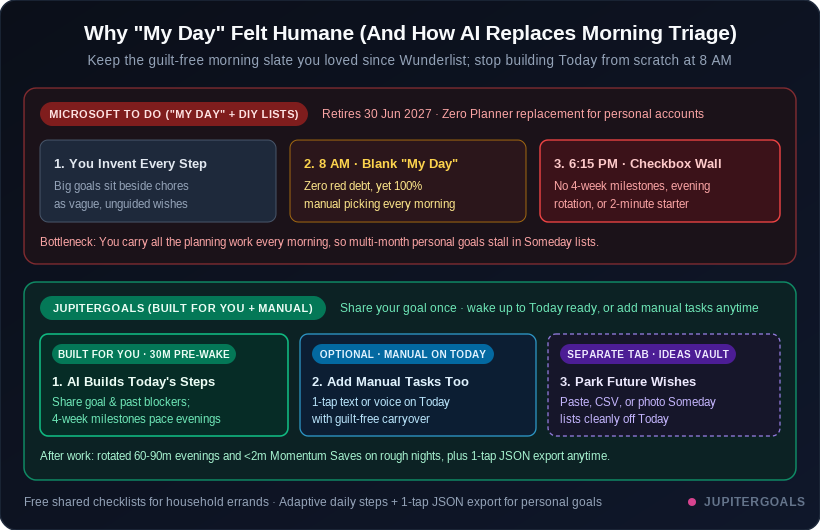
3. Let AI Build Today (Or Add Your Own Tasks Anytime)
When I built JupiterGoals, I wanted to keep the clean morning slate of “My Day” while removing the daily chore of inventing and picking every step yourself:
- Wake up to Today already built: Share your goal, starting point, available evenings, and past blockers (rescuing your goal graveyard). JupiterGoals maps 4-week milestones and writes concrete steps 30 minutes before you wake up, rotating 3 to 4 goals across realistic evenings around your calendar and shrinking rough days under two minutes (with zero streaks).
- Add your own Today tasks anytime: Prefer hands-on control for one-off personal errands or spontaneous wins? Jot them down in one tap by text or voice right beside your AI-built steps: unfinished manual tasks carry forward guilt-free next morning, and extra goal progress automatically adjusts tomorrow’s plan (how GPS rerouting works).
- Park Someday lists in a separate Ideas tab: Paste plain text, drop Classic Outlook CSV rows, or upload list screenshots into a dedicated offline Ideas workspace, and merge duplicates from old lists in one tap. Nothing touches Today until you choose to turn an idea into a goal or a single task.
Rescue Your Goals Before Shutdown Day (And Keep 1-Tap Export Forever)
If Wunderlist and Microsoft To Do taught one lesson, it is never locking years of personal plans inside an app without an instant exit. Move your personal lists now so your 2027 goals begin with a gentle rehearsal.
Start 7 days free on Max with no credit card required and zero automatic charges ever (plus 30% off Month 1 through 31 Dec if you choose a monthly plan). Not ready after Day 7? Your account moves peacefully into the free Read-Only Archive with every goal, log, note, and 1-tap JSON export preserved at no cost.
Related Articles
The AI Daily Planner Map: Honest Trade-Offs Between Motion, Sunsama, Morgen, Reclaim, Todoist, and JupiterGoals
An objective buyer's guide comparing Motion, Sunsama, Morgen, Reclaim.ai, Akiflow, Saner.AI, Lifestack, Griply, Todoist, and JupiterGoals across scheduling automation, calendar OAuth privacy scopes, bad-day recovery, and month-to-month vs. annual pricing.
Read article →Motion vs. Sunsama vs. Reclaim vs. Griply for Personal Goals: Why Work Schedulers Starve Your Life After 6 PM
Motion, Sunsama, Reclaim, and Griply each solve a slice of scheduling, yet personal goals still die after 6 PM. Here is why corporate calendar blockers starve your evening hours and what works instead.
Read article →All your goals. One realistic plan.
JupiterGoals fits everything you're working toward into one plan sized to your day. Shrink or swap a step on hard days and keep moving.
Start freeNot ready to sign in? Get product updates by email →