Motion vs. Sunsama vs. Reclaim vs. Griply for Personal Goals: Why Work Schedulers Starve Your Life After 6 PM
If you work a full-time 9-to-5 and still want to train for a race, ship a side project, and learn a language, buying a smart calendar app looks like the obvious move.
You pay $20 to $34 a month, connect your work calendar, add your personal ambitions, and wait for time-blocking magic. Three weeks later, your work meetings look immaculate while your side project has been shoved to 9:45 PM for the fourth Tuesday in a row.
Work schedulers are built to pack daytime tickets around corporate meetings; personal goals survive only if a system protects the 60 to 90 discretionary minutes you actually control after 6 PM. Before building JupiterGoals, I tested the major schedulers and goal trackers to understand why evening ambitions keep starving inside them.
| Tool | Typical Monthly Cost | Core Design Center | What Breaks for Personal Goals After 6 PM |
|---|---|---|---|
| Motion | ~$29-$34/mo | Team project deadlines & work auto-scheduling | Urgent daytime tickets push flexible personal goals to 9:30-10:30 PM when your brain is fried. |
| Sunsama | ~$20/mo | Intentional daily work planning ritual | Requires a 10-15 minute manual planning ceremony every morning; skip four days and triage feels like a chore. |
| Reclaim.ai | Free-$18/mo | Defending recurring calendar slots | Books an empty “45m Side Project” calendar block, with no concrete next step, scratchpad, or 2-minute shrink option. |
| Griply | Free-$12/mo | Hierarchical life areas & static goal trees | Clean goal breakdown, yet static templates do not auto-rotate evenings, leaving red overdue tasks after crunch weeks. |
| JupiterGoals | £12 / £19 / £29/mo | Adaptive multi-goal execution outside 9-to-5 | Auto-rotates 3-4 goals into 60-90 evening mins before wake-up, with .ics + Google Calendar sync, 2-min floor, and zero overdue debt. |
Where Each Scheduler Hits a Wall After Work
Every tool in that table is genuinely good at the job it was built for. The friction starts when you ask a daytime work tool to carry long-horizon personal change.
1. Motion treats your identity like low-priority slack
Motion shines when an agency or engineering lead needs hard client deadlines packed around changing meeting invites.
Personal goals rarely have a boss enforcing a Friday SLA. So the moment a 3 PM production bug or late client call lands on your calendar, deadline-driven auto-scheduling does the mathematically rational thing: it bumps your run or coding block to 10 PM. On screen, the block still “fits” inside Tuesday. In human biology, a 10 PM deep-work block is dead on arrival.
2. Sunsama’s daily ritual becomes friction on hard weeks
Sunsama deserves credit for teaching knowledge workers to cap daily workload instead of hoarding infinite backlogs.
The catch for personal goals is the 15-minute manual planning tax. Dragging tasks from Linear or Jira over morning coffee makes sense when your employer pays for that hour. Having to manually curate, estimate, and timebox four personal goals every single day adds planning homework right where you wanted momentum.
3. Reclaim defends time without telling you how to start
Reclaim solves calendar defense cleanly: it carves out a recurring 45-minute slot before colleagues book over it.
Yet an empty calendar rectangle titled “Guitar” or “Launch MVP” does nothing to cure 6 PM couch inertia. When you unlock your phone tired after dinner, an empty calendar event has no progressive milestone curriculum, no notes from Thursday’s session, and no one-tap way to drop down to a 2-minute version that still counts.
4. Griply maps the tree, then leaves you with static templates
Griply gets much closer to personal ambition by organizing life visions into sub-goals and habits.
Where static goal trees break is Week 3 collision. Without an engine that automatically alternates heavy sessions across the week or sheds load after short sleep, four active goals compete for the same Tuesday evening until missed habits turn into red overdue debt (the exact trap that triggers quitting).
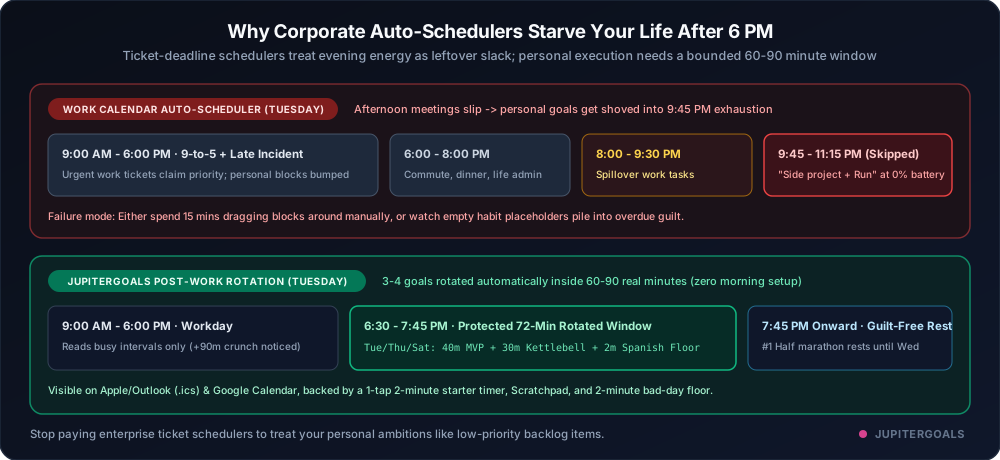
How I Built JupiterGoals for the 60-90 Minutes You Own
Designing specifically for post-work builders meant flipping three assumptions:
- Automatic weekday rotation, zero morning homework: Rank your three or four active goals once. Heavy sessions alternate across
Mon/Wed/FriandTue/Thu/Satautomatically 30 minutes before you wake up, keeping tonight’s list inside 60 to 90 real minutes while off-day goals rest or stay warm on a 2-minute floor. - Calendar visibility without meeting takeover: Every plan includes a live 1-way
.icssubscription for Apple Calendar and Outlook, while Pro and Max add optional 2-way Google Calendar sync that reads busy intervals only (never meeting titles) to offer a shorter session on packed workdays (asked, never told). - Couch-to-action tools inside the step: Instead of an empty calendar block, every step opens with a 1-tap 2-minute starter timer, hands-free audio pacing cues, and an auto-saved Thinking Scratchpad so you start moving in seconds.
Keep your work scheduler if your company pays for it between 9 and 5. For the goals that belong to you after 6 PM, start 7 days free on Max, with 3 Pledges and no card needed.
Related Articles
Missed a Day and Never Got Back on Track? It's the Plan, Not You
Most goals don't fail on day one. They fail the day after a miss. A simple 3-part model for getting back on track, and why it changed what JupiterGoals is.
Read article →Why OpenAI’s "LifeVal" Proves Chatbots Can’t Carry Your Goals (And What Does)
OpenAI's new LifeVal benchmark (built from nearly 4,000 people's real time use) shows AI agents jumping from 49% to over 80% on everyday life admin. Here is where LifeVal stops, why personal goals still break in Week 2, and the 3 rules that carry them.
Read article →All your goals. One realistic plan.
JupiterGoals fits everything you're working toward into one plan sized to your day. Shrink or swap a step on hard days and keep moving.
Start freeNot ready to sign in? Get product updates by email →