Forecasting AI Agent Build Time: Using Git History and Task Graphs to Pick Your Parallel Lanes
When you write code line by line, you have a natural feel for how long a feature will take and exactly how much work is still pending. Once AI coding agents do most of the writing, that intuition disappears.
Whether you are a solo builder running parallel AI clones on trunk or a technical leader asked “how long will this take?”, traditional story points no longer apply. Asking an LLM to estimate its own time fails too, because it answers in human sprint units (“2 to 3 days”). Even the closest industry research on long AI tasks only measures capability (whether a model can solve a task that takes a human 4 hours), not how many minutes your own setup will run.
To get that visibility back without building a telemetry server, I rely on two things already in my repository: a clean Dependency Graph (DAG) in the spec and plan, and version-control history (git log) as the stopwatch.
Across 412 finished build tasks executed across all three of my CLI harnesses (Antigravity CLI, Claude Code, and Codex) and 44 past plans, counting a task’s checklist steps predicts total agent work within 24%, and walking the dependency graph upfront tells me whether a plan tops out at 2 lanes or scales to 7 lanes (cutting 7.0 hours of agent work down to 1.2 hours on the clock, a 5.8x speedup).
Step 1: Structure Specs and Plans as a Clean Dependency Graph (DAG)
You cannot parallelize or forecast a wall of prose. To make work parallelizable before any coding agent starts, my living specifications and implementation plans form an explicit Directed Acyclic Graph (DAG):
- Spec-Level Graph: Every specification header declares what it
Depends on:and what itPrecedes:. An agent never starts planning or building a spec until its upstream specs are merged onmain. - Task-Level Graph (True Blockers Only): Inside a plan, Task B lists Task A as a dependency only if Task B’s tests cannot pass without Task A’s code (such as a database table or API endpoint). Everything else is independent.
- Explicit File Lists (And Splitting Big Files First): Every task lists the exact
.java,.tsx, and.pyfiles it will edit so non-overlapping tasks run together. If a task names a file over 500 lines (or 300 lines for a React component), the plan requires an earlier task to split that file first so parallel agents never fight over one monolith.
Step 2: Use Git History as the Stopwatch
Because I delete completed implementation plans once they land so agents never read old checklists as current rules, storing timing metrics inside plan files would lose history. Instead, the forecast script reads every completed task directly from git log:
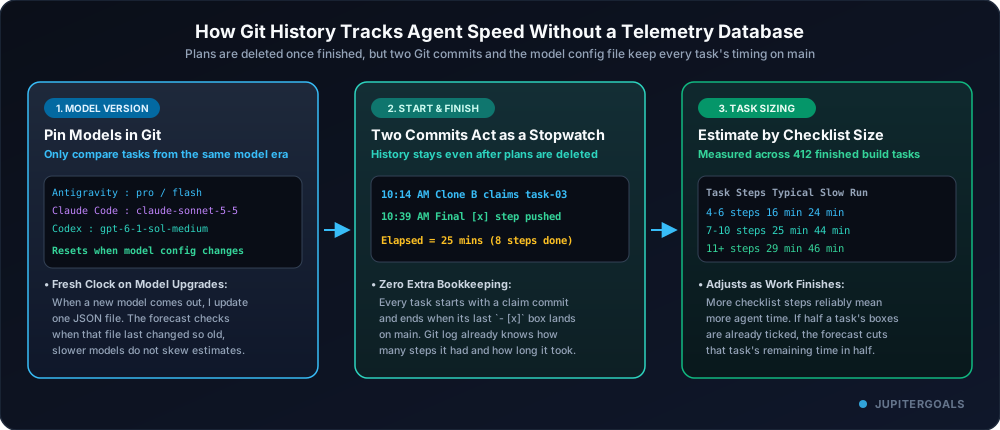
- Two Commits Bound Every Task: Claiming a task pushes a start commit to
main(recording which lane and CLI harness claimed it), and finishing the task pushes the commit that ticks its final- [x]checkbox. - Tiered Model Config in Git: My agent instructions assign tasks by capability tier (
reasoningfor spec grilling and planning,fastfor implementation) and map those tiers in one tracked JSON config across Antigravity CLI (Gemini 4 Argon/Gemini 3.8 Flash), Claude Code (Opus 5.5/Sonnet 5.5), and Codex (GPT-6 Astra/GPT-6.1 Sol). The forecast checksgit logfor the last time a model pin changed in that config file so estimates always reflect the active models. - Checklist Steps Predict Duration: Across 412 build tasks landed over 12 days, tasks with more
- [x]steps reliably take longer and fall into three clear buckets:
| Task Size | Checklist Steps | Typical Time | Slow-Run Time | What Usually Fits Here |
|---|---|---|---|---|
| Small | 4 to 6 steps | 16 min | 24 min | Single-layer change, bug fix, or focused UI update with tests. |
| Medium | 7 to 10 steps | 25 min | 44 min | Cross-layer slice touching backend service, OpenAPI sync, and React view. |
| Large | 11+ steps | 29 min | 46 min | Full workflow spanning database migration, domain logic, contract, and UI. |
Step 3: Walk the Graph to Pick How Many Lanes to Run
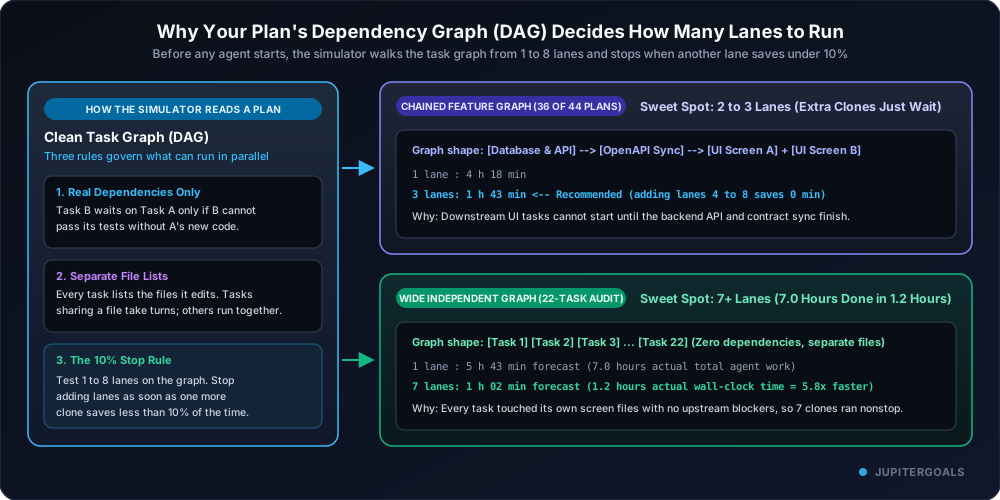
Before I start a build, the forecast script walks the plan’s dependency graph across 1 to 8 lanes using the exact same dependency and file-locking rules that live clones use, and recommends the fewest lanes after which adding another saves under 10%:
Testing this forecast against 44 past multi-task plans (using only history that existed before each plan started) revealed four practical lessons:
- Total Agent Work Forecast Within 24%: Across all 44 plans, the predicted total agent work before the plan started was within 24% of actual agent build time.
- Why Chained Feature Plans Stop at 2 to 3 Lanes: In 36 of the 44 plans, the simulator recommended just 2 or 3 lanes. Because vertical features naturally chain
Database & API -> Contract Sync -> UI Screens, spinning up 6 or 8 clones buys zero extra speed; extra lanes just wait on upstream tasks. - 5.8x Speedup When the Graph Is Wide: On a 22-task UI audit where all 22 tasks had zero dependencies and touched separate screen files, the forecast predicted ~1 hour on 7 lanes. In actual execution across 7 clones, 7.0 hours of agent work finished in 1.2 hours on the clock, a 5.8x speedup.
- Idle Clones Are the Real Bottleneck: Most multi-day plans needed only 5 to 6 hours of active agent work, yet stretched across 60 to 120 hours of calendar time because clones sat idle between sessions.
Why This Matters for Technical Leaders Too
When engineers wrote every line by hand, a tech lead or engineering manager could ask “how much is left?” and get an intuitive answer because the developer had mentally walked every file. When LLMs write the code, teams lose that pulse.
A Git-backed forecast restores that visibility:
- Before work starts: As soon as a spec is broken into a task graph, you know whether it is 90 minutes of agent compute or 7 hours, and whether putting 4 engineers or 4 agent lanes on it will actually speed it up or block on a single critical path.
- While work is running: Because agents commit and tick
- [x]steps as they go, the forecast automatically scales down each task’s remaining time by its unchecked steps, giving you a live readout of what is pending without interrupting anyone.
Three Caveats to Keep in Mind
- Pooled vs. Per-Harness Timings: While my central model config and agent instructions explicitly define which models run in Antigravity CLI, Claude Code, and Codex, earlier claim commits only recorded the clone lane (
Lane A..H), pooling all three harnesses into one shared baseline. I recently started stamping the specific harness name into each claim commit so future forecasts can compare speeds per harness and across model upgrades. - Measures Full Setup Delivery, Not Pure Token Speed: Because the clock runs from the claim commit to the landed commit on
main, it includes local database container startups, rate-limit pauses, and waiting for the landing lock to rebase and run pre-push tests. It measures how fast this workflow ships verified code, not raw LLM speed. - Human Gates Are Separated: If a task waits on a manual step (such as approving a paid API run or cloud resource), the forecast assumes the gate is cleared and flags it explicitly so human response time never distorts agent estimates.
The Takeaway
- Structure specs and plans as a clean DAG with true dependencies only and explicit file lists per task, splitting large shared files first.
- Use
git logas your stopwatch by bounding every task between a claim commit and a landing commit, so you can delete finished plans without losing metrics. - Pin model versions in Git so your historical averages automatically reset when frontier models upgrade.
- Use the forecast to replace lost line-by-line intuition, giving both solo builders and technical leaders a clear view of how many lanes to run and how much work is still pending.
(If you want to follow the journey of building JupiterGoals, you can claim 1 month free early access and get all future updates.)
Related Articles
From Prompt Engineering to Loop Engineering: Why /goal Beats Babysitting AI Agents
Why prompt engineering hits a ceiling, how AI development evolved across 5 stages from code snippets to autonomous verification loops, and how to write quantifiable /goal prompts in Antigravity CLI and Claude Code.
Read article →Codex vs Claude Code vs Antigravity CLI: Which AI Coding Agent Is Worth It?
I ran three AI coding harnesses side by side on their entry-level plans. One burned through my limits fastest and still needed the most retries. Here is what I saw, why it happens, and the harness-agnostic setup I'm sticking with.
Read article →All your goals. One realistic plan.
JupiterGoals fits everything you're working toward into one plan sized to your day. Shrink or swap a step on hard days and keep moving.
Start freeNot ready to sign in? Get product updates by email →